Shared Polices
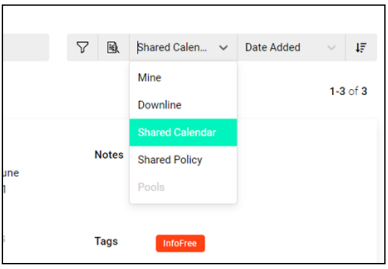
1. With the new Joint Field Work feature, you can now view shared clients and shared policies. This will remove duplicates going forward and can be accessed through your contacts page by selecting Shared Policy in the dropdown on the List View.
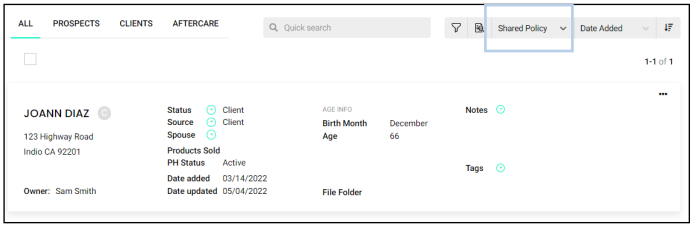
2. After selecting the contact from your list of Shared Policies, you can select “Policies” along the top of the contact record. This will display all shared policies for the contact.
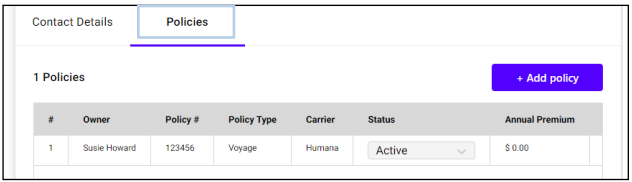
3. You can view and edit the policies using the three dots located on the right hand.

Shared Calendar
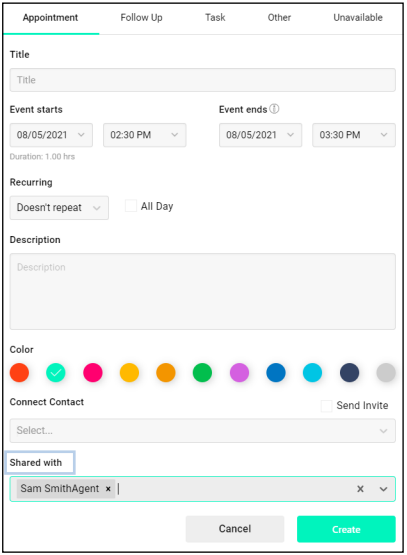
1. To create a Shared Calendar event, use the “Shared with” box when entering the event details to select an agent’s name.
2. You can also view the calendar for agents in your downline by adding them on your calendar page. Start typing their name in the “Favorite Users” box on the left hand side and when they appear in the dropdown select their name to add them to your list.
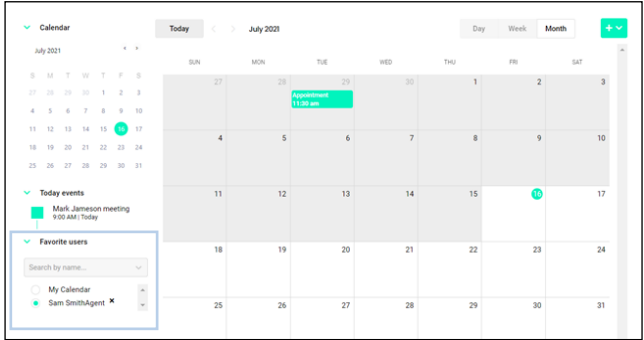
3. Use the radio buttons next to “My Calendar” and other users calendars to toggle back and forth between viewing your events and the events on their calendar .
4. You can also view the contacts you have a shared calendar event from the list view. Click the drop down that says Mine and select Shared Calendar.