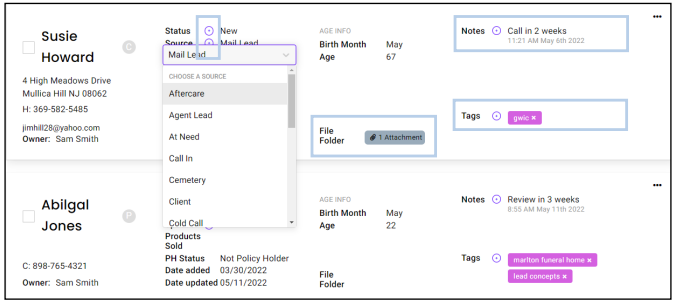
1. On the List View you can see several pieces of information for the contact: Name, Address, City, State, Zip, County, Phone, E-mail, Status, Source, Spouse Name, Products Sold, Policyholder Status, Date Added, Last Updated, Birth Month, Age, File Folder, Notes and Tags.

2. You can update Status, Source, Spouse and Tags right from the list view. You can also add a new note from the list view by clicking the plus icon located next to the field. Attachments can also be viewed from your list view by clicking the icon in the file folder field.
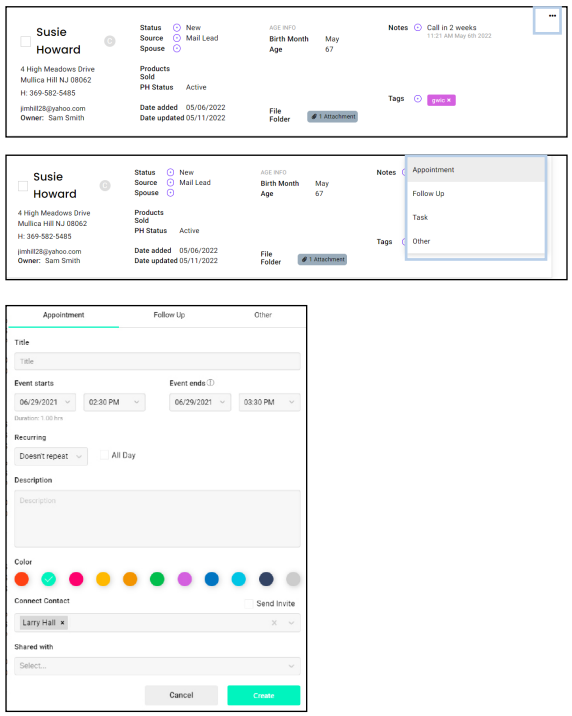
3. To set an Appointment, Follow Up, or Task from the list view, select the 3 dots on the right, select the event type, and add the event details.